
Using a standard SIM in an iPad

I tried this for several reasons: to share my iPhone data plan with my iPad, to see how difficult it was, and because I will likely want to swap SIMs between my dev iPhones, iPad, and my iPhone 4.

Also, soon I will be traveling internationally and plan to take only my iPad for computing. If trimming down a standard SIM is easy, I can plan to buy a prepaid SIM in each country. If micro SIMs are unavailable, I have a simple method for converting any standard SIM into an iPad/iPhone 4 compatible one.

Prerequisites: An iPad, a standard SIM from an iPhone or any other 3G GSM phone, a pair of sharp scissors, an x-acto knife, and a credit card (or unused SIM).

1. Create micro SIM adapter (skip a-d if using a spare SIM)

a. lay the iPhone SIM on top of the credit card.
b. using the tip of an x-acto knife or a fine marker, scratch the SIM outline onto the card.
c. cut out the new SIM adapter with scissors
d. Use a piece of sandpaper or the edge of the x-acto knife to scrape/sand the edges until the adapter fits into the iPhone SIM tray.

This next step is to position the micro SIM properly in the adapter. The micro SIM must be positioned so that the contacts of the micro SIM are aligned with the contacts of the SIM. I achieved this by flipping my SIM adapter and tray over, and aligning the contacts of the micro SIM in the tray slot. The net result is that my adapter has a border around 3 sides that is of identical size.

e. set the micro SIM on top of the adapter with the tabbed corners aligned
f. align the micro SIM so that it is centered horizontally and the bottom (non tabbed) border is the same width as the side borders.
g. mark the outline on the adapter with the x-acto
h. cut out with x-acto knife. Cut gently and accurately at first, and make subsequent passes to deepen the cut until you are through the material.
i. using the x-acto, scrape off adapter material until the micro SIM snaps into the slot

When you’re finished, is should look a lot like this:
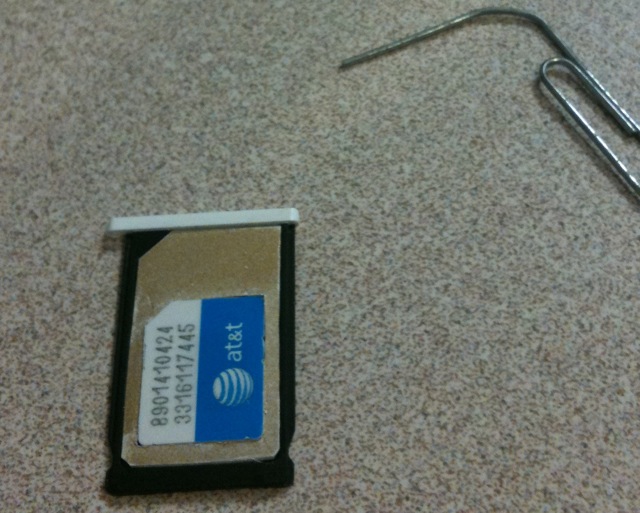
micro SIM adapter

2. Test micro SIM adapter

Insert the micro SIM into the adapter, the adapter into the tray, and the tray into the iPhone. I did so with my iPad micro SIM which was not activated. Upon doing so, my iPhone 3GS detected the SIM, showed AT&T as the carrier, the 3G icon lit up, and I received the following notice, “Could not activate cellular data network: You are not subscribed to a cellular data service.”

Voila, my adapter allows a micro SIM to work in my iPhone. Phase 1 was successful!

3. Cut SIM down to micro SIM size

I was a bit hesitant to hack up my SIM card. If I erred and destroyed my SIM, it would require a trip to the Apple or AT&T store for a new SIM, as well as an $18 activation fee. But I couldn’t help myself.

Since the adapter was already built, this step was actually very straight forward.

a. set the adapter on top of the iPhone SIM
b. mark the cutout with the x-acto knife
c. trim off the edges of the SIM with scissors.
d. shave the edge of the trimmed SIM until it fits into the adapter

Notice the alignment of the contacts in the photo. When the SIM and adapter are aligned, the contacts will not be cut. I repeat, the contacts will not be cut.
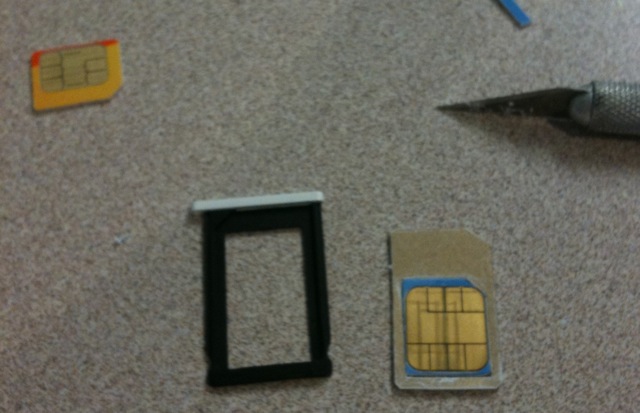
4. Test SIM in iPad and iPhone

a. stick the newly minted micro SIM into the adapter and the iPhone and verify functionality.
b. point your iPad (w/o SIM) web browser at www.unlockit.co.nz and install a custom IPN for your carrier
c. move the new micro SIM from the iPhone to the iPad
d. turn off the iPad wifi and test 3G connection

I called my iPhone number while the SIM was inserted into the iPad. I was hoping I’d get dumped into voice mail, but instead I get an AT&T error message stating that calling feature wasn’t available from my number. I suggest setting your iPhone call forwarding before and after using an iPhone SIM in an iPad.

Alan Mulally, american hero?

When I test drove a Chevy Malibu I was distinctly unimpressed. When I drove the Nissan Altima I was impressed. The Camry, Accord, and Jetta TDI all met my expectations. But when I drove the 2009 Fusion, I was surprisingly impressed, no doubt because I had such low expectations of domestic vehicles.

The Fusion was a pleasant surprise on many levels. Not since my 1989 SHO have I been so impressed by a domestic auto. With such a surprising change of course, I looked to see who was behind it, and his name is Alan Mulally.

Turning around Ford before it was imperiled like its other motor town brethren was prescient, but not heroic. To achieve that status of hero one must go further than just doing his job. It would take something amazing, such as releasing a new car that bests my legendary 1989 SHO in every possible way. I plan to test drive the new 2010 SHO, and I hope to be impressed.

BSD, how I love thee

Gordon called this morning. I always like hearing from Gordon, and today was no exception. Even when “the pooh has struck the rotary oscillator,” Gordon is polite and amiable. Since Gordon manages a slew of networks, the best way to keep in touch with him is to break one of his servers.

To make sure he doesn’t forget about me, I wrote a program to do this automatically. I’m quite clever about it. The breakages coincides with power outages, lightning strikes, and other such events so my tracks are always covered. Gordon has to call me at least once every year or two.

After a manual fsck, his server back came back online but wasn’t working. We figured out that he’d changed the default gateway of the network since the machine was last rebooted. We updated the routing table on the machine and all was well. Since it had been 14 months since the box was last touched, we decided I should do some updates.

Partway though, I filled up /var. Oh, the partition is only 256MB. That’s a tad on the small side, I thought. Then I looked at the disk size: 16GB. RAID 5. Seriously? 9GB disks. And 256MB of RAM. The Pentium III processor dates the machine to circa 1999. And I just upgraded the OS to current. Amazing.

iPad 3G and iPhone data plan

I picked the 3G iPad for 2 reasons: I want the 3G data while traveling, and I want the GPS because so many mobile apps make good use of it. I didn’t like the wait but it was worth it. Even without a 3G data plan active, the built in GPS is useful when coupled with a GPS app like Motion GPS, which has support for map caching. I have maps for the entire Greater Seattle area (street and topo) cached on my iPad.

For the car, I find the iPad to be a better car GPS than a mobile phone for two reasons. Because of the larger screen, I can nearly always see what I need in a single glance. The distraction time is less than with a mobile phone where the need to scroll, swipe, and tap little buttons is greater. The other reason the iPad beats a mobile phone for GPS is raw speed. Pressing a button results in instant changes, so there’s very little time spent glancing at the device to see if the desired data is displayed yet.

The best 3G iPad feature is being able to drop my iPhone SIM into the iPad and use the 3G data plan I already pay for. The ability to do so is limited by only two things: the carrier profile on the iPad needs to be set appropriately, and the iPhone SIM cards physical size. The iPad is not carrier locked so setting the carrier profile is a snap. That leaves dealing with the SIM cards physical size.

Some people have speculated that Apple chose the micro SIM format as a concession to AT&T. While that may be the case, I believe that Apple is leading the industry towards adoption of the micro SIM format and the soon to be released iPhone will also use the smaller SIM card.

I wanted to use the iPad with my existing 3G iPhone. An old credit card (for adapter material), a pair of kitchen shears, an x-acto knife, and a bit of careful trimming yielded me an adapter and a micro SIM I can use in both devices.

To 3D or not to 3D?

I’m still not sure I prefer 3D movies. We watched Avatar in 3D when it came out, at the really big IMAX (we have 3 in the area). Movie aficionados tell us that’s the only one to consider. Jen enjoyed the 3D experience where I just found it jarring. I kept finding myself thinking about the plot (or lack thereof) and the effects rather then being engaged and immersed.

Perhaps it is something in my head. I am rarely able to see the 3D stereograms that so many people enjoy.

I have been looking forward to seeing Avatar in 2D. Tonight we watched it on the 96″ HD screen in the living room. The planet of Pandora is smaller and less impressive in 2D. Or perhaps, that’s the difference between watching on a screen several stories tall versus one 4′ tall. Dropping off the side of a cliff on a banshee is less exhilarating. But I enjoyed the movie more. I was able to stay engaged.

Jen prefers the 3D version. And we both think the score was sorely lacking. But the movie is good enough to watch several times.

Weight Loss Recipe

The mathematics of weight loss is, in fact, quite simple, involving only subtraction. “Take in fewer calories than you burn, put yourself in negative energy balance, lose weight,” says Braun, who has been studying exercise and weight loss for years. — Weighing the Evidence on Exercise

U.S. consumers spend over $60,000,000,000 dollars a year on weight loss products, when the real solution is to eat less.

Life Lessons

“Daddy, can I have some brown cake?”
“Brown cake, I inquired?”
“Yes, the one you brought home,” Lucas answered.
“Sure,” I answered, as I watched him grab one. Not wanting to miss out, Kayla came running and grabbed one too.
“Take a small bite,” I cautioned as they both took big bites, and proceeded to spit them out on the floor.
“Ewww, what is that?” they asked, between sputters.
“Coffee grounds from the expresso machine.”

iPad and iPhone battery life

In his article, Why the iPad and iPhone don’t Support Multitasking, Robert Love says:

Apple says they do not support multitasking because it is a hamper to stability and a drain on battery life. That clearly isn’t true—the iPad has plenty of processing power and battery capacity.

Two words Robert: legacy devices. While the iPad and iPhone 3GS both have sufficient CPU to handle multitasking, neither the original iPhone nor the 3G does. I am reminded of this every time I use a 3G. Further, while the iPad seems to have plenty of battery life, that is a word very few people use to describe the battery life of any touchscreen phone.

Rumor is that Apple is going to add multitasking in a future OS release. This rumor likely is true. Is Apple somehow going to make background applications not consume any battery? Of course not. These excuses are straw men.

Except that’s almost exactly what Apple did. They provided application developers with the utility of background processing, but without the egregious consequences. Not surprisingly, multitasking only works on the current generation of iPhone OS devices.

The real reason that the iPad and iPhone do not allow third-party applications to multitask is likely more complex, more technical. …

I believe the rest of Robert’s argument is spot on. Where I differ with Robert is that he thinks the CPU and battery life are straw men. I believe they are very real issues that Apple has to contend with.