
Costa Rica, day 3

This resort (Los Lagos) is exquisite. Tropical, remote, volcano in the background, fancy restaurant with food catering to U.S. tastes, lush gardens, frog garden, ant farm, butterfly sanctuary, crocodiles, caymans, zip lines, horseback riding, and the highlight: a water park with dozens of pools and slides into the cool (74°), warm, and hot water. It’s everything one might expect from a first world resort, with lots of fun surprises.

The restaurant is open air, as most are. Tropical wildlife watching is part of the dining experience. The night before, Lucas spent a long time peering under the table. We finally figured out that he knew there were crocs here. He relaxed after we told him they were in cages. At breakfast, we watched a bird snack on fresh fruit off another diners plate while he refilled at the buffet. Nobody told him who he shared with. We watched an iguana sunning himself within reach of a chair. Then we hit the pools again.

The pools are not chlorinated. This makes swimming for hours very enjoyable. The water is spring fed, and after passing through the pools, it drains into the fish ponds, where tilapia and a couple other fish featured on the menu swim. From the fish ponds, the water drains to the gator ponds, frog farm, and the many gardens before returning to the river. They don’t ‘use’ water here as much as they temporarily divert it. Many of the ponds are dry because this is the dry season. There are two seasons here: wet and dry.

Unlike the houses in C.R., the resort housing has large roof overhangs to defend against the hot midday and afternoon sun. Most Ticos don’t bother, they are used to the heat. When we left Maria’s house yesterday morning, we were in shorts and Maria wore jeans, sweater and boots. It was a “chilly” 75° F.

Here at the resort, hot water comes from thermal springs and a solar hot water heater (for the restaurant). All the buildings are made of concrete, for its imperviousness to moisture, and for modulating the diurnal temperature swings. The thermal mass absorbs midday heat and releases it at night. Hot water is a luxury in Costa Rica. Most Ticos don’t have hot water. They take cold showers, wash their hands in cold water, etc. Their sinks usually have only one handle. Since we are in the tropics, cold water isn’t very cold.

There is a large open pool with a swim up wet bar. There are several group sized retreats for parties to congregate. Further up the hill, the hot pools get progressively smaller and more intimate, with privacy walls and couple sized caves.

In a nod to Eco-consciousness, the rooms have a “green switch.” It’s not green in color, but when you enter the room, you place your key in a slot next to the door which turns on the electricity. When the key is removed, the power to the room shuts off.
Margin Call

Last night we watched Margin Call, a thriller whose script is a clever copy and paste of real events during our financial crisis. Because the plot elements have nearly all been publicized in the past few years, I found no suspension of belief required to completely engage.

There is however a problem with the movie. Despite the admirable attempts to make the plot comprehensible and educational while entertaining, the movie is still littered with barely explained acronyms (CDO, CDS, MBS), unexplained concepts like leveraging models, reserve requirements, and other financial jargon. We paused the movie several times as I was asked to explain. It’s a fun movie, but I’d first recommend that people first watch Inside Job and Wall Street.

For something quite educational, Bill Moyers has a great series of educational videos called Winner-Take-All Politics: How Washington Made the Rich Richer and Turned its Back on the Middle Class (On Winner-Take-All Politics, Crony Capitalism, How Big Banks are Rewriting the Rules of our Economy).

Green built houses

With house prices and interest rates low, we are considering homeownership again. We have looked at hundreds of houses in the past year and found a half dozen that we really liked. What we haven’t found is a house we like at a price we like.

In 2011 we learned about three standards in the green building industry:

  • Passive House: limits household energy consumption to 120 kWh per cubic meter. A Passive House is very efficient and there are tens of thousands of houses built to this standard in Germany, Scandanavia, and Canada.
  • Net Zero: consume zero energy and zero carbon emissions annually.
  • Energy Plus: produce more energy annually than is consumed.

In 2011 we attended several green energy festivals. We toured a couple Passive Houses and the only Net Zero homes in the Puget Sound area. The cost of getting to net-zero is 15% more than building a traditional home. Our goal is to get as far as we can towards net-zero. A net-zero home has a monthly gas and electric bill of $0. Getting to net-zero requires reducing energy consumption through:

  • an efficient building envelope (super insulated, tightly sealed, oriented for beneficial solar gain)
  • highly efficient fixtures and appliances (LED lights, induction cooktops, solar water heaters, heat pumps)
  • a heat recovery ventilator (recover heat from ventilation air before exhausting it)

The other ingredient required to achieve net-zero is energy production. Solar has long (at least since the Chinese & Greeks oriented their buildings to face the winter sun 2,500 years ago) been the first answer for harvesting energy. Until the 1970s, the best available technology was exposing internal masonry to the sun. The thermal mass of masonry would warm up in the day and then give off the stored heat at night.

Using solar exposed masonry is still an excellent and highly efficient way to collect heat. The obvious limitation is availability of sunshine, which is often meager in Seattle’s heating season.

Retrofitting an existing house to achieve green building standards is more complex than building the house well initially. This has made choosing a house more challenging. I desire the ability to retrofit a house up to at least the Passive House standards. Some house designs make this more challenging than others. For example, I can’t easily change the orientation of a house to capture beneficial solar gain. Generally, houses are sited for the convenience of the builder rather than the long term benefit of the occupants.

In the meantime, we aren’t waiting for a new house to be more environmentally aware. We have reduced our household waste to less than one kitchen bag per week. The majority of food waste is diverted to my compost pile and the rest is recycled. I have replaced all our household lights with LED bulbs. In areas where lights were typically left on, I installed motion sensors with timers. We have a hybrid Ford Fusion and a Nissan Leaf, greatly reducing our gasoline consumption.

Deposit checks to EverBank with a ScanSnap scanner

I have a bank account with EverBank. They have a feature that enables check deposits from home. It uses a Java applet that runs in the browser. The applet includes a scanner driver that directly controls any TWAIN compliant scanner. The general idea is that a customer will go to their web site, log in, turn on their scanner, click the “make an online check deposit,” and then the Java app will scan and upload the image.

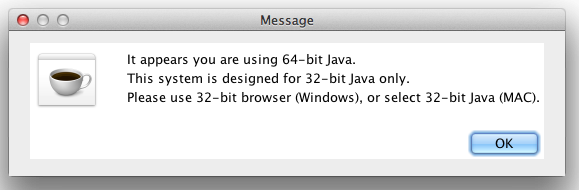
That scenario doesn’t work for me because my ScanSnap document scanner is not TWAIN compliant and likely never will be. So I contacted EverBank and their support staff “changed” my account so that it runs a different Java applet. Instead of controlling a TWAIN scanner, it accepts two scanned JPEGs. Once the changes to my account were completed, I tried using the feature and got this error message.

There’s two straight forward ways to tackle this problem.

  • Do as they suggest and select 32-bit Java. Run the Java Preferences app in Applications / Utilities. Reorder the list so 32-bit Java is first. This works, but it means that all Java apps will run 32-bit instead of 64-bit.
  • The other workaround is to set one web browser to run in 32-bit mode and always use that browser for online banking. Since I rarely use FireFox, I set FireFox to run in 32-bit mode and it worked as expected.

Then I set up a new ScanSnap profile for scanning checks. I named it “EverBank” and configured the following options:

  • Application: Scan To File
  • Image Quality: Best (slow)
  • Color Mode: Color
  • Scanning Side: Duplex
  • File format: JPEG
  • Paper size: Auto
To deposit a check, I switch to the EverBank profile, scan the check, and then choose the resulting files in the Java applet. It works.

Apple Pie Parfait

Today’s breakfast treat was a fairly healthy Apple Pie Partfait.

Apple Pie Parfait
  1. thin layer of grape nuts
  2. 3/4″ layer of plain yogurt
  3. thin layer of grape nuts
  4. generous 3/4″ layer of apple pie filling
  5. thin layer of grape nuts
  6. 3/4″ thick layer of plain yogurt
  7. sprinkling of finely crushed ginger snap cookies

The result was eight thumbs around around the breakfast table. The fresh yogurt is deliciously creamy without the fat. The grape nuts are a very satisfying crunch without the fat of a crust.

Backstory

This meal was spawned between then tensions of desire for an apple pie and knowing that my grandmothers genes are mostly why I have elevated cholesterol. I wanted apple pie, but I didn’t want the calories or saturated fats in a delicious butter crust. Continue reading “Apple Pie Parfait”

Minivan + kids + interior lights = dead battery

Our family vehicle is a Honda Odyssey. The dome lights are toggle switches. Push the light, it’s on. Push again, it’s off. There’s no visible way to tell which position it’s in. If a child pushes the light and it gets left on, the next morning we have no minivan until after a date with Mr. Battery Charger. Since the kids were able to reach the dome lights, we’ve been vigilant. There are ways to be vigilant. We’ve tried:

  1. Exit the vehicle. Close all doors. Lock with the remote so interior lights turn off. Peer inside to see if any lights are on.
  2. Disable interior lights entirely with switch on dash.
  3. Re-enable interior lights, but forbid children from ever, ever, ever touching the light switches.

The third solution works most of the time. On Nov 3rd, I gave some neighbor kids a ride home from school. When they got out, one of them pushed the light switch to turn it off. The lights don’t turn off when the door is opened, so nothing happened. The child exited the van. Having trained my kids not to touch the switches, I didn’t perform #1. On Nov. 4th, we biked to school while Mrs. Odyssey and Mr. Charger hooked up.

On Nov. 5th, I found this post on the OdyClub site, detailing the LED bulbs another Honda owner ordered from China and installed in his Odyssey. I paid $28 for the following ten LED bulbs, shipped: (1) 51109, (4) #51002, (2) 35725, (1) 34641, and (1) #34608. When they arrived a couple weeks later, I installed them in about 15 minutes.

Last night, both kids were reading books on the ride home from swim classes. Both kids left their interior lights on. Both parents failed to notice. This morning, I opened the garage and saw the lights on. I smiled. When I got in, the van started. Mission accomplished.

My Top iOS Apps

iPad Most Used Apps: Mail, Notes, Epicurious, Safari, Instapaper, FeedlerPro, PasswordWallet (PW)

Mail & Safari: neither require much explanation. Both apps are mature and reliable. Mail works great for presenting a unified view of my 6 email boxes (iCloud, Gmail, 2 personal, 2 business). Reading mail and browsing on the iPad are more enjoyable. If the iPad is nearby, it gets grabbed before an iPhone.

Notes and I weren’t very fond of each other at first. The awful Marker Felt font and no decent sync consigned it to an unused app screen. When iOS 4 brought sync support, I finally began using the Notes app as well as Notes feature in Mail.app on my Mac. On the Mac, I can change the font. What a relief! Since the two sync, I can make changes on the Mac or iPad.

I enter my recipes as notes on my Mac. Then I view them on the iPad in the kitchen. I often make small edits in the kitchen too. All those, “I should update that…” things actually happen now, while I’m thinking of it. Here’s a few of the notes I have: Apple Pie, Whole wheat pie crust, Gordon’s Chili, Carrot Cake, Yogurt [making] notes, Blackberry Pie. I do use notes for other things, like Perl Best Practices, Javascript Cheat Sheet, W3C DOM, Climbing: Plan Trip, Climbing: Packing List, Seattle Bucket List, and notes I’ve taken while reading numerous books.

Epicurious: I like the Epicurious app. It’s rather poky, but it has a recipe sync feature that makes it worthwhile. I can browse through the epicurious.com site and find recipes, add them to my “recipe box” and then go to the kitchen, pull up Epicurious, and then view the recipe I just chose. The laptop in the kitchen idea never worked well (I tried several times) but the iPad in the kitchen is delicious!

Instapaper: Go get it. Use it for a week. You will love it. Trust me.

Feedler Pro: RSS feed reader. An excellent one. If you subscribe to RSS feeds, it’s indispensable.

Password Wallet: I have 788 passwords. Every web site, computer, app, software registration, etc has it’s own password. Most are randomly assigned by PW. They are stored in an encrypted file that syncs between my Mac, iPhone, and iPad.

Less Used But Great iPad Apps: Twitter, Facebook, AIM, iSSH, Photos, Redfin.

iPhone Most Used Apps: Mail, Grocery IQ, Calendar, Camera, Safari, Notes, PW, FeedlerPro, Instapaper, Google Maps, OmniFocus, USAA (killer feature: deposit checks with my phone), Chase (killer feature: the only business checking with iPhone deposit, else I’d be rid of my TBTF bank account entirely), Scrabble, Facebook, Instagram, Reminders.

I have at least a dozen other apps I love, but only use on occasion. For example, the Airport Utility, for configuring my WiFi. I don’t use it often, but when I do, I’m really glad to have it. Apps like that: Stocks, Vanguard, Waze, AIM, WordPress, Skype, NPR, My TSA, FlightView, iBooks, Kindle, Remote, Youtube, Allrecipes, Dropbox, Zillow, Reunion, Epocrates, WordBook, iGrill (bluetooth remote for my kitchen temp probe), and of course, a handful of games and edu apps for kids.

wordpress blank page when updating

WordPress provides an upgrade feature that makes it point and click easy to upgrade themes, and plugins. For years, this has never worked for me. Anytime I click the “update” button, I get the FTP login tab. I enter my credentials and then I get a blank page in the right pane. No error message. No error logged. This broken feature didn’t bother me much because it’s pretty easy to update the plugins manually. But it was annoying.

Today I installed another WP blog for a client and decided I really ought to make this work. I double checked permissions, and then noticed that even after providing credentials, I wasn’t seeing a FTP connection arrive when I attempted an upgrade. It was then that I had my ‘duh’ moment. I have a minimal PHP install, with only required plugins. I installed the FTP plugin for PHP and voila, plugin and template install/updates work.

If you are getting a blank page when upgrading a wordpress plugin, verify that PHP’s FTP module is installed and active.