In November 2009, Palm announced Flash support for WebOS in the first half of 2010. In February 2010, Palm released WebOS 1.4 with support for Adobe Flash 10.1 Beta, which would be available for download in the Palm App Catalog. On April 18th, Adobe’s CEO announced that Flash for Android and WebOS would be delayed until the second half of 2010.
Today, Palm announced that they don’t know why Flash for WebOS is not yet available. Perhaps, like Steve Jobs pointed out, after years of trying, Adobe still cannot deliver a version of Flash that runs well on any mobile phone. Look at how poorly Flash performs on the HTC EVO, a brand new phone with super-sized hardware specs.
Goodnight Flash. You will be remembered fondly as a relic of another time. Just like floppy disks, token ring networks, and Helen Thomas.
Kayla: Daddy, may I use your nail polish?
Me: Why don’t you use mommies?
Kayla: It doesn’t match.
Me: Uh, okay.
Now Kayla has one hand that is purple and one that is pink. The toes on her left foot are blaze orange and the toes on her right are cherry red. In my view, her toe colors exactly match the colors of polish and/or duct tape I use to mark my climbing gear. In her view, having blaze orange toes on the left foot and cherry red toes on the right is a perfect match.
I tried this for several reasons: to share my iPhone data plan with my iPad, to see how difficult it was, and because I will likely want to swap SIMs between my dev iPhones, iPad, and my iPhone 4.
Also, soon I will be traveling internationally and plan to take only my iPad for computing. If trimming down a standard SIM is easy, I can plan to buy a prepaid SIM in each country. If micro SIMs are unavailable, I have a simple method for converting any standard SIM into an iPad/iPhone 4 compatible one.
Prerequisites: An iPad, a standard SIM from an iPhone or any other 3G GSM phone, a pair of sharp scissors, an x-acto knife, and a credit card (or unused SIM).
1. Create micro SIM adapter (skip a-d if using a spare SIM)
a. lay the iPhone SIM on top of the credit card.
b. using the tip of an x-acto knife or a fine marker, scratch the SIM outline onto the card.
c. cut out the new SIM adapter with scissors
d. Use a piece of sandpaper or the edge of the x-acto knife to scrape/sand the edges until the adapter fits into the iPhone SIM tray.
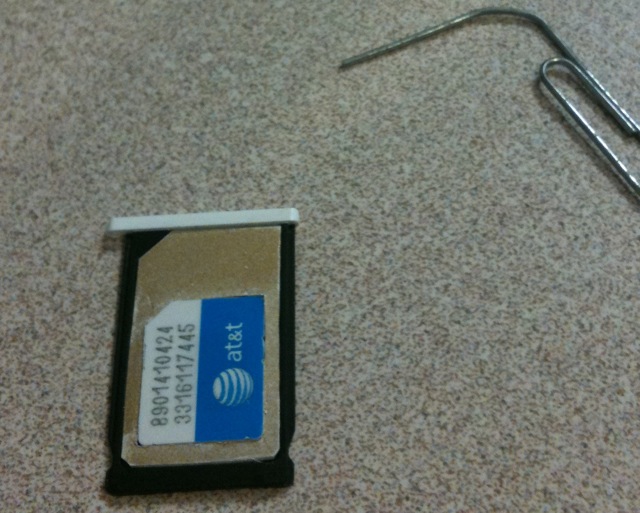
This next step is to position the micro SIM properly in the adapter. The micro SIM must be positioned so that the contacts of the micro SIM are aligned with the contacts of the SIM. I achieved this by flipping my SIM adapter and tray over, and aligning the contacts of the micro SIM in the tray slot. The net result is that my adapter has a border around 3 sides that is of identical size.
e. set the micro SIM on top of the adapter with the tabbed corners aligned
f. align the micro SIM so that it is centered horizontally and the bottom (non tabbed) border is the same width as the side borders.
g. mark the outline on the adapter with the x-acto
h. cut out with x-acto knife. Cut gently and accurately at first, and make subsequent passes to deepen the cut until you are through the material.
i. using the x-acto, scrape off adapter material until the micro SIM snaps into the slot
When you’re finished, is should look a lot like this: micro SIM adapter
2. Test micro SIM adapter
Insert the micro SIM into the adapter, the adapter into the tray, and the tray into the iPhone. I did so with my iPad micro SIM which was not activated. Upon doing so, my iPhone 3GS detected the SIM, showed AT&T as the carrier, the 3G icon lit up, and I received the following notice, “Could not activate cellular data network: You are not subscribed to a cellular data service.”
Voila, my adapter allows a micro SIM to work in my iPhone. Phase 1 was successful!
3. Cut SIM down to micro SIM size
I was a bit hesitant to hack up my SIM card. If I erred and destroyed my SIM, it would require a trip to the Apple or AT&T store for a new SIM, as well as an $18 activation fee. But I couldn’t help myself.
Since the adapter was already built, this step was actually very straight forward.
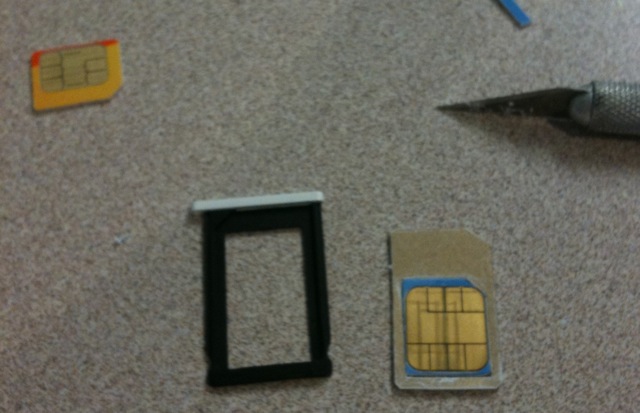
a. set the adapter on top of the iPhone SIM
b. mark the cutout with the x-acto knife
c. trim off the edges of the SIM with scissors.
d. shave the edge of the trimmed SIM until it fits into the adapter
Notice the alignment of the contacts in the photo. When the SIM and adapter are aligned, the contacts will not be cut. I repeat, the contacts will not be cut.
4. Test SIM in iPad and iPhone
a. stick the newly minted micro SIM into the adapter and the iPhone and verify functionality.
b. point your iPad (w/o SIM) web browser at www.unlockit.co.nz and install a custom IPN for your carrier
c. move the new micro SIM from the iPhone to the iPad
d. turn off the iPad wifi and test 3G connection
I called my iPhone number while the SIM was inserted into the iPad. I was hoping I’d get dumped into voice mail, but instead I get an AT&T error message stating that calling feature wasn’t available from my number. I suggest setting your iPhone call forwarding before and after using an iPhone SIM in an iPad.
When I test drove a Chevy Malibu I was distinctly unimpressed. When I drove the Nissan Altima I was impressed. The Camry, Accord, and Jetta TDI all met my expectations. But when I drove the 2009 Fusion, I was surprisingly impressed, no doubt because I had such low expectations of domestic vehicles.
The Fusion was a pleasant surprise on many levels. Not since my 1989 SHO have I been so impressed by a domestic auto. With such a surprising change of course, I looked to see who was behind it, and his name is Alan Mulally.
Turning around Ford before it was imperiled like its other motor town brethren was prescient, but not heroic. To achieve that status of hero one must go further than just doing his job. It would take something amazing, such as releasing a new car that bests my legendary 1989 SHO in every possible way. I plan to test drive the new 2010 SHO, and I hope to be impressed.
Gordon called this morning. I always like hearing from Gordon, and today was no exception. Even when “the pooh has struck the rotary oscillator,” Gordon is polite and amiable. Since Gordon manages a slew of networks, the best way to keep in touch with him is to break one of his servers.
To make sure he doesn’t forget about me, I wrote a program to do this automatically. I’m quite clever about it. The breakages coincides with power outages, lightning strikes, and other such events so my tracks are always covered. Gordon has to call me at least once every year or two.
After a manual fsck, his server back came back online but wasn’t working. We figured out that he’d changed the default gateway of the network since the machine was last rebooted. We updated the routing table on the machine and all was well. Since it had been 14 months since the box was last touched, we decided I should do some updates.
Partway though, I filled up /var. Oh, the partition is only 256MB. That’s a tad on the small side, I thought. Then I looked at the disk size: 16GB. RAID 5. Seriously? 9GB disks. And 256MB of RAM. The Pentium III processor dates the machine to circa 1999. And I just upgraded the OS to current. Amazing.

You must be logged in to post a comment.